
PenMagic’s Letter Express: An Impressive Assistant
From the Original Pages
Click a page to enlarge · Alt-click to open the full issue
PenMagic has been an innovator since day one. With ground-breaking programs such as Numero for PenPoint, the company has demonstrated its understanding of the mobile computer market.
PenMagic’s new offering, Letter Express for Newton PDAs is another fine example. Letter Express streamlines the process of creating notes, letters, memos, and email on a Newton.
The program does this by letting you store your own phrases, notes, and signatures as “snippets.” Using these snippets, you can piece together a note or letter faster than you could by writing—and with a little planning, probably faster than you could type it!
Letter Express also comes with an enhanced on-screen keyboard that, while not intending to replace the Newton keyboard, includes many useful features. For example, you can change the size or style of the text, select all text in a document, start a new bulleted or numbered paragraph, center text, and more.
Also, Letter Express’ on-line help is very helpful in getting any user started quickly.
Steps to Create a Note
Creating a complex note is surprisingly simple. From outside the application, you can use Newton’s Intelligent Assistant to address a note by entering write <name-of-the-person>.
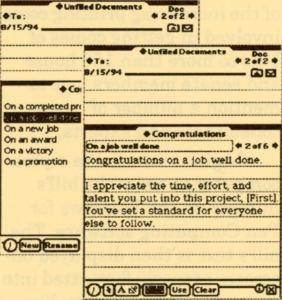
Once inside, you can take advantage of either the supplied snippets, or your own custom snippets, to create the bulk of the message. Of course, you can use any of the standard Newton editing methods—such as handwriting, or the pop-up keyboard— to complete the document.
Selecting a snippet is simple. Tapping on the Snippets button presents a menu of pre-written text categories. Examples of these includes Opening, Congratulations, Following up, Closing, and any other categories that you may have added.
Tapping on a snippet category presents the list of snippets themselves. You can select to use any that you are familiar with, or you can preview a snippet as illustrated in the figure to the right.
The snippets can contain placeholders for your name, your company name, or other pieces of information stored in your Names file. You can also select from one of several formats for the letter, ranging from informal to formal styles.
You continue on by selecting more and more snippets, occasionally inserting or editing text specific to the particular note. When completed, you can navigate through the note, store it in a folder, or send it using Newton’s email, fax, or printing capabilities. Arrow buttons also enable you to navigate through the various notes you have already created in a folder.
Editing on a Mac or PC
The Newton is fine for creating documents and editing snippets on-the-go. However, a little planning can save you a lot of time in the future. Using an optional PenMagic product called Personal Computer Link for Letter Express, you can create and manage custom snippets on your Mac or Windows-based computer.
Summary
PenMagic has a history of creating clever programs for mobile computers, and Letter Express for the Newton is no exception. The program has a very obvious everyday utility that is missing from many other PDA products.
Letter Express and Personal Computer Link for Letter Express are available directly from PenMagic for $69.95 and $29.95 US.
Contact:
PenMagic Software Inc.
310-260 West Esplanade
North Vancouver, B.C.
Canada V7M 3G7
(800) 771-6244 (order)
(604) 988-9982
(604) 988-0035 (fax)
Transcribed from Pen-Based Computing, Volume 4, Number 5 — June 1994. Page 6.