
aha! InkWriter 2.0 Carries the Torch
From the Original Pages
Click a page to enlarge · Alt-click to open the full issue
Much has been written—in this newsletter and elsewhere—about the vertical nature of the early pen computing market. However, if one were to design a horizontal application with mass appeal, what features would it contain?
While we all have our wish lists, the people at aha! software corporation are continuing to move forward in what appears to be the right direction. On June 10th, 1994, aha! started shipping its highly acclaimed InkWriter program on a new platform—Microsoft’s Windows for Pen Computing.
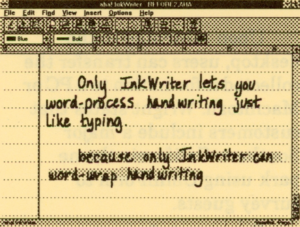
For those familiar with the existing PenPoint implementation, version 2.0 for Windows features a very similar look-and-feel. As expected, however, the program incorporates the standard Windows user interface model including tool bars, rulers, and scroll bars.
Anyone who has written any amount of text on a regular piece of paper knows exactly what’s wrong with paper and what should be part of any pen computer. For people who have worked with a word processor, expectations and requirements are suitably increased. Simply put, InkWriter attempts to give you the piece of paper you always wanted.
Some Important Features
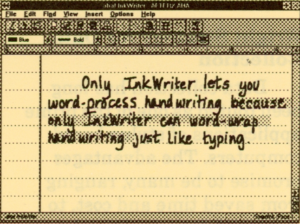
InkWriter enables you to add, delete, and rearrange your handwritten words as you would with a word processor. The magic starts when InkWriter then dutifully re-wraps your writing, just like a word processor.
Using patent-pending technology aha! calls SmartInk and InkWrap, you can write, draw, edit, drag and drop, and convert printing to ASCII using word processing features along the way.
For example, you can use the tool bar to bold, italicize, underline, strikeout, or highlight both written and translated words on the screen. You can also add rough sketches, and optionally have InkWriter tidy them in place.
More Tools
A handy space tool lets you add and remove as much space as needed when entering new writing. In addition, you can select from several types of paper including narrow, college, standard, and wide ruled. This enables you to write big using wide rule and view more compactly using narrow.
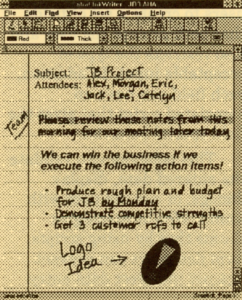
Even more interesting, you can search for words in your document without first having to convert the writing to ASCII. Using a feature aha! calls InkWriter, you can specify the level of matching from loose to exact. Experimentation showed that loose matching produced several false hits, while exact matching was very accurate.
InkWriter works with the recognizer you have installed under Pen Windows. In working with the standard Microsoft recognizer, we were quickly frustrated by being forced to print if we wanted to later use the recognition features. Fortunately, InkWriter’s clever design makes this a secondary consideration even when you need to perform serious word processing-style work.
InkWriter 2.0 for Windows has a suggested list price of $199 and will be available on promotion until August 1, 1994 for $149. For more information, contact aha! at 1-800-AHA-SOFT.
Contact:
aha! software corporation
1685 Plymouth Street
Mountain View, CA 94043
(800) AHA-SOFT (order)
(415) 988-2080
(415) 988-2081 (fax)
Transcribed from Pen-Based Computing, Volume 4, Number 5 — June 1994. Page 3.