
Developing for Magic Cap Using CodeWarrior
From the Original Pages
Click a page to enlarge · Alt-click to open the full issue
It’s the classic Catch-22. Computer users wait for useful applications to appear before purchasing a new computing device. Likewise, developers wait for a critical mass of potential customers before committing scarce money and resources to a new platform. When no one takes the first step, nothing happens and the platform fails.
Until the release of CodeWarrior Magic by Austin, Texas (and Saint Laurent, Quebec) based Metrowerks, General Magic itself complicated this delicate equation by making it difficult for the average small, but motivated developer to get into the act. However, now that the environment is widely available, developing for Magic Cap is only $299 and several hundred pages of documentation away from being a reality for nearly anyone.
In this article, we’ll take a condensed look at the new environment and see how well it equips an aspiring Magic Cap developer.
CodeWarrior Magic/MPW
CodeWarrior Magic actually comes as part of Metrowerks’ CodeWarrior Gold. Inside the small, book-sized, box are two CD-ROM disks, one containing the CodeWarrior environment proper, the other containing the CodeWarrior Developer material. It is on this second CD-ROM that you find the applications, libraries, and documentation directly related to Magic Cap development.
Installation is straightforward and nearly effortless (since it’s from a CD-ROM), however it is a bit time consuming, as over 90 MB of data is being moved to your local hard disk. This process installs the two major components of the system: a configured version of the trusty Macintosh Programmers Workshop (MPW), along with the Magic Cap development tools, utilities, and sample code.
This installation reflects the fact that for the initial release, Metrowerks has paired its high-performance compiler and linker, MWCMagic and MWLinkMagic respectively, with MPW and General Magic’s object-oriented development environment. The compiler generates Motorola 68349 object code suitable for Magic Cap.
The next release of CodeWarrior Magic, scheduled for September of this year, will integrate General Magic’s components into Metrowerks’ new integrated object-oriented development system. Either way, the current configuration is capable of working on both 68K and Power PC-based Macintosh computers.
Building an Application
Since the current environment is based around MPW, application projects are built using standard make files. Application builds can be targeted for the Macintosh, the Sony Magic Link, or the Motorola Envoy. In the case of the former, you can also instruct the system to automatically launch the Magic Cap simulator (more about this later).
Just Browsing
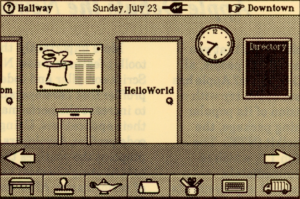
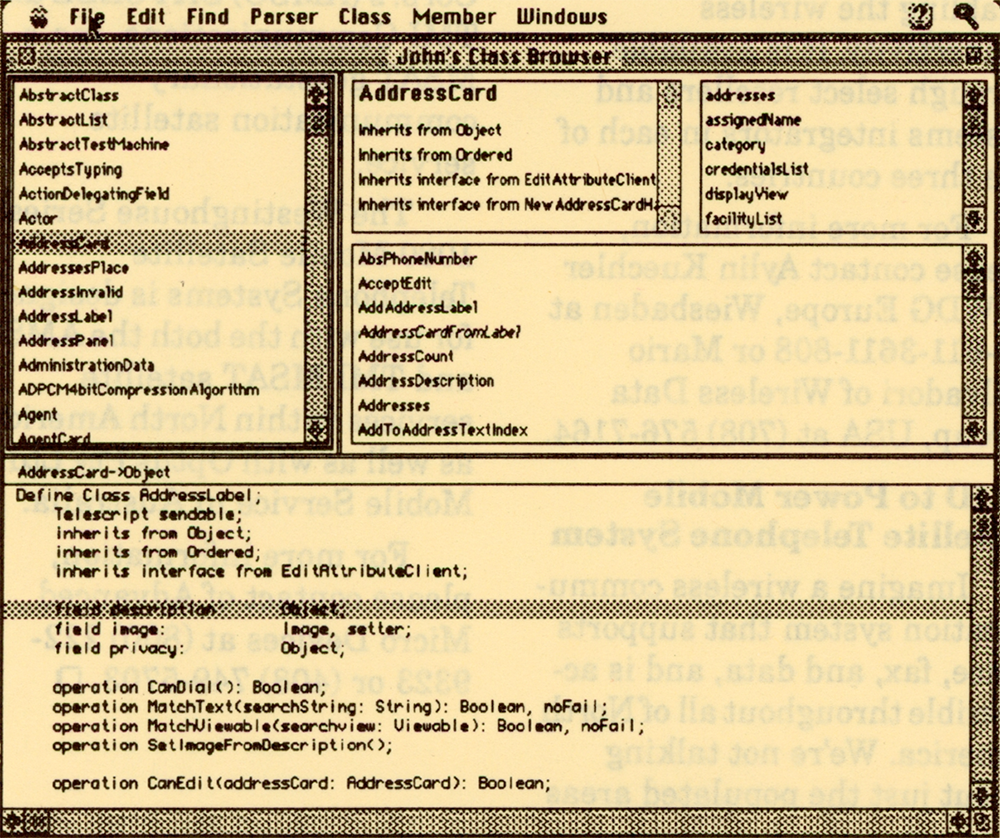
One of the most useful tools for getting a handle on the intricacies of Magic Cap’s object oriented architecture is the General Magic-supplied Bowser Pro (no that isn’t a misprint, Bowser is the name of the bunny that lives at General Magic). This class and source code browser uses a familiar Smalltalk-style interface with multiple panes enabling you to bounce (like Bowser) around from one object to another, building a mental road map along the way.
Bowser has a preprocessing phase that reads and parses class definitions, creating a browser document. Afterwards, you can examine any of the Magic Caps objects in detail. For example, you can see where the AddressCard inherits its behavior and interface, along with the methods and fields within the object.
The Magic Cap Simulator
CodeWarrior Magic includes a very useful tool for testing and debugging your application on the Macintosh: the Magic Cap Simulator. This program enables you to simulate real-world events normally occurring on a communicator including powering on and off, resetting, inserting a new card in either of the two slots, and generating an incoming call.
More importantly, the simulator lets you do things that are impossible with a real communicator, including dumping objects to a log file, displaying a window with debugging messages, validating the current package or the entire system, and initiating a storage leak checker.
Capturing screens for manuals and other publications is another important problem that the simulator solves. For cases where the four level gray screen capture is inadequate, CodeWarrior Magic includes a special version called “Magic Cap for screen shots.” This application enables you to capture 256 colors or grays.
Online Documentation
To keep the size and cost of the package down, Metrowerks has included almost all of the system documentation on the supplied CD-ROMs. While the advantages of this generally outweigh the negatives, there are a couple of inconsistencies that make getting at certain information more difficult than using regular paper manuals. Of course, you can always print the online documentation, however this is time consuming and bulky (generally on 8 1/2 x 11-inch, single-sided paper).
Most of the CodeWarrior and MPW documentation is stored in Apple DocViewer format, while much of the Magic Cap material is in Adobe Acrobat’s PDF format. A small amount is stored as HTML files, suitable for viewing with a web browser such as Netscape. While documents belonging to the same set are indexed and include hypertext links, I would have preferred to use a single viewer and single format.
Other Neat Gadgets
CodeWarrior Magic comes with what seems like hundreds of sample applications and code fragments for your enjoyment. One of the more interesting ones I came across was the MIDI folder. This folder contains every Magic Cap song in MIDI format. The folder also includes a small application, “Make MIDI,” which takes a MIDI file and converts it into a Magic Cap resource file. Get your synthesizers ready!
Metrowerks
3925 West Braker Lane, Suite 310
Austin, TX 78759-5321
(512) 305-0400
(512) 305-0440 (fax)
[email protected]
http://www.iquest.com/~fairgate
Transcribed from Pen-Based Computing, Volume 5, Number 8 — August 1995. Pages 6, 7.