
Conversations with Microsoft’s Pradeep Singh and Dr. John Butler
From the Original Pages
Click a page to enlarge · Alt-click to open the full issue
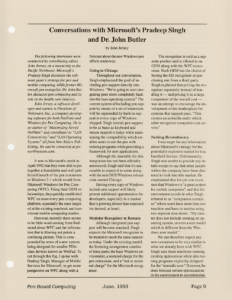
The following interviews were conducted by contributing editor, John Jerney, on a recent trip to the Pacific Northwest. Microsoft’s Pradeep Singh discusses the software giant’s strategy for pen and mobile computing, while former Microsoft pen evangelist, Dr. John Butler, discusses pen computing and its role in the health care industry.
John Jerney, a software developer and author, is President of Volksware, Inc., a company developing software for both PenPoint and Windows for Pen Computing. He is co-author of “Maximizing Novell NetWare” and contributor to “LAN Connectivity,” and “LAN Operating Systems” all from New Riders Publishing. He can be contacted at [email protected].
It was to Microsoft’s credit in April 1992 that they were able to put together a formidable and well publicized launch of the pen extensions to Windows 3.1 which would form Microsoft Windows for Pen Computing (WPC). Using their OEM relationships, they quickly established WPC on most every pen computing platform, especially the ones targeted at the existing notebook and transitional mobile computing market.
However, recently there seems to be little word coming from Redmond about WPC and the information that is filtering out paints a confusing picture. This is compounded by news of a new system being designed for smaller PDA-class devices known as WinPad. To cut through this fog, I spoke with Pradeep Singh, Manager of Mobile Services for Microsoft, to get some perspective on WPC along with a forecast about the new Windows pen efforts underway.
Going to Chicago
Throughout our conversation, Singh emphasized the goal of including pen support directly into Windows. “We’re going to start integrating pens more completely back into the base operating system.” The current system of including pen support by means of a set of extensions will be superseded by built-in support in every copy of Windows shipped. Singh intends pen support to be as basic as keyboard and mouse support is today while maintaining the compatibility which enables users to use the pen with existing programs while providing a framework for new applications.
Although the timetable for this integration has not been officially announced, Singh said that it’s reasonable to expect it to come along with the next DOS/Windows release code-named Chicago.
Having every copy of Windows include pen support will likely present additional opportunities for developers, especially in a market that is growing slower than expected (or desired, at least).
Modular Recognizer to Remain
Although integrated pen support will become standard, Singh expects the Microsoft recognizer to be treated in much the same manner as today. Under the existing model, the licensing arrangement consists of three parts: the base Windows environment, a nominal charge for the pen extensions, and a “not so nominal charge” for the Microsoft recognizer.
The recognizer is sold as a separate product and is offered to an OEM along with the WPC extensions. Each OEM has the choice of buying the MS recognizer or purchasing one from a third-party. Singh explained that pricing the recognizer separately instead of bundling it — and pricing it as a large component of the overall cost — was an attempt to encourage the development of the marketplace for systems that support pens. “This creates an umbrella under which other recognizer companies can survive.”
Nothing Revolutionary
I was eager for any information about Microsoft’s strategy for the potentially explosive market for tiny handheld devices. Unfortunately, Singh was unable to provide any details except to say that other people within the company have been chartered to look into this market. He emphasized that his job was to ensure that Windows is “a great system for mobile computers” and that the environment excels in what Singh referred to as “companion scenarios” where users have more than one machine and have to survive using two separate data stores. “My charter does not include creating an operating system, or even a user model which is different from the Windows user model.”
We can therefore expect any new extensions to be very similar to what we already have with WPC. Singh sees these machines running existing applications while also running programs explicitly designed for the “nomadic user.” However, he does forecast certain optimizations in the environment to accommodate the low storage and low battery life associated with today’s machines. In this scenario, he sees machines such as the GRiD Convertible, and others like it to be ideal target machines.
With seemingly multiple messages coming from Microsoft about their future for mobile pen computing, I was concerned whether developing for WPC is effectively a holdover effort until Microsoft gets around to doing the right thing. Singh sidestepped this concern by noting that of the approximately 8 million notebooks that will be sold next year, 60-70% will run Windows, which provides a very rich base on which to develop. “The basic element of the pen strategy was that an operating system by itself is meaningless, users don’t buy operating systems — that’s not interesting. What’s interesting is application software that’s written to take advantage of the operating system. It’s the only thing that’s interesting.”
Clipboards a Tough Sell
Because the costs associated with building applications are high, Singh sees the pen-based notebook market as one of the most promising horizontal opportunities for developers. He views the current class of clipboard devices, which seem better suited for specialized vertical applications, as a hard sell. This is because the sell cycle is too long.
“The bad news is that the conversion ratio of each of the [sales] cycles is pretty bad because each stage is questionable, risky, and these people are conservative.” Singh sees this situation continuing until a ground swell similar to the PC market exists. When managers begin to see that, for a couple of hundred extra dollars, you can get this “cool new thing for alternative input,” people may buy it even if they are uncertain about the future of the pen.
Compared with clipboard devices, Singh sees a much simpler and shorter sell cycle for convertible-type machines. He notes that “the sell cycle is 15 days, 10 days; and the buy decision is made by a million people.” Singh predicts that users of convertible-style machines need only one or two pencentric applications to complement their existing suite of programs which he naturally hopes will include Microsoft Word and Excel.
Mobile “Satellites”
With this information, Microsoft’s strategy begins to reveal itself. Singh envisions people using laptops and notebooks in transit as satellite machines along with their regular desktop computers. With Windows well established on the desktop, this market offers the kind of numbers in which Microsoft has traditionally been interested. Singh realizes that much of this momentum is in the hands of third-party application developers and therefore sees Microsoft’s goal as getting enough “sockets” (in this case MS Windows) in the marketplace into which developers can plug their applications.
As a message to developers, he added, “I have two choices, the optimum pen platform with the optimum pen UI, and no strategy to sell a socket to an end user. And you can bust your butt to write a great app and sell none of them. Or I can give you a strategy where I’ll have a million of these [pen machines] out there… You pick it, which choice do you want?”
Getting Back to the Office
As head of the Mobile Services group, Singh has identified several features that are desirable in a system that includes a mobile satellite computer that needs to communicate with a typical office environment. Singh conceded that some of these ideas have already been implemented in other environments and stressed that none of these features are set in stone. These features include:
- Remote network access (as a peer) over phone lines
- Slow link awareness, including indication of the status of a data transfer and permitting users to abort long transfers. (In the case of electronic mail, this could mean transmitting only message headers to a remote machine instead of entire messages.)
- A global address book for use by all applications
- Deferred I/O and asynchronous data exchange using inboxes and outboxes
- A smart inbox which defines its behavior depending on the machine and the nature of the communications link
- File, record, and message synchronization between desktop and satellite computers
- Network connection and disconnection without requiring a boot cycle
PenPoint Has Chicken/Egg Problem
Singh acknowledges the technical sophistication of PenPoint while at the same time doubting that many developers are jumping on the PenPoint bandwagon. He believes that this is “because they are scared of the selling proposition. They don’t know why somebody would buy this machine that runs PenPoint. This is because of the chicken and egg problem. They don’t know how the hundreds of applications are going to get out there which is going to get somebody to walk in the store to buy a PenPoint machine.”
Transcribed from Pen-Based Computing, Volume 3, Number 3 — June 1993. Pages 9, 10.