
Microsoft Introduces Palm PC and Auto PC
From the Original Pages
Click a page to enlarge · Alt-click to open the full issue
Implications lie deeper than the diminutive PalmPilot challenger
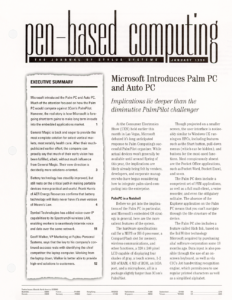
At the Consumer Electronics Show (CES) held earlier this month in Las Vegas, Microsoft debuted it’s long anticipated response to Palm Computing’s successful PalmPilot organizer. While actual devices won’t generally be available until around Spring of this year, the implications are likely already being felt by vendors, developers, and corporate managers who have begun considering how to integrate palm-sized computing into the enterprise.
PalmPC in a Nutshell
Before we get into the implications of the Palm PC in particular, and Microsoft’s embedded OS strategy in general, here are the more salient features of the system.
The hardware specifications call for a MIPS or SH-3 processor, a CompactFlash slot for memory, wireless communications, and other functions, a 320 x 240 pixel LCD capable of displaying four shades of gray, a touch screen, 1-2 MB of RAM, 4 MB of ROM, an IrDA port, and a microphone, all in a package slightly larger than 3Com’s PalmPilot.
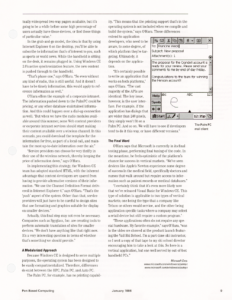
Though projected on a smaller screen, the user interface is noticeably similar to Windows CE running on HPCs, including features such as the Start button, pull-down menus (which can be hidden), and buttons for the most-used functions. Most conspicuously absent are the Pocket Office applications, such as Pocket Word, Pocket Excel, and so on.
The Palm PC does include a competent set of PIM applications, as well as a full mail client, a voice recorder, and even the obligatory solitaire. The absence of the Explorer application on the Palm PC means that you can’t navigate through the file structure of the device.
The Palm PC also includes a feature called Rich Ink, based on the InkWriter technology Microsoft acquired by purchasing aha! software corporation some 18 months ago. Data input is also possible through the use of an on-screen keyboard, as well as via CIC’s Jot handwriting recognition engine, which permits you to use regular printed characters as well as a simplified alphabet.
The Big Picture
While squarely aimed at the consumer market, and designed to compete head-on with PalmPilot, the Palm PC nonetheless has a number of implications in vertical markets. This is partly so because Microsoft sees Palm PC, as well as the simultaneously announced Auto PC, as merely two instantiations within the much larger embedded systems market.
“We hope to see Windows CE appear just about everywhere,” says Robert O’Hara, original development manager of the Palm PC. “We see a role for Windows CE on any kind of device, basically anything smaller than a traditional PC.”
“We see a role for Windows CE on any kind of device, basically anything smaller than a traditional PC.”
Microsoft’s thinking goes something like this. The cost of processing is continuing its downward spiral, still faithfully following Moore’s Law. This means that a fair number of embedded applications—ranging anywhere from entertainment electronics to home appliances—that currently use four and eight-bit processors may soon transition to volume-produced 32-bit processors.
Meanwhile, communication is becoming increasingly ubiquitous as more and more devices that have computers in them feel the need to exchange information with other devices. This communication could take place via infrared, radio-based wireless, or even using LANs designed for the home. “The trend that you’re going to see is more and more devices getting ‘smart’,” says O’Hara.
“We’ve already seen smart phones, and we’re going to see VCRs that no longer flash twelve at you. They will be told by the network what time it is. Then your VCR will be able to talk to your Web TV, and so on. In other words, devices with computers will want to talk to each other, with the goal of making each of the devices easier to use.”
Based on the Win32 kernel, Windows CE brings two major advantages: the awesome development resources of the largest software firm in the world, and the ability to offer industry standard development tools, presenting an essentially zero learning curve for anyone who already knows how to program Windows.
Of course, not every Windows CE application needs to display a pretty face. “The interesting thing,” says O’Hara, “is that much of it may never get seriously noticed. In the end, Windows CE may show up in devices where you might not even know it’s around. For example, what’s the operating system in your car, or in your microwave?”
However, Microsoft’s early development efforts are clearly focused on a core set of product categories, including the Handheld PC, the Palm PC, the Auto PC, and Web TV. “The next version of Web TV will use Windows CE, although there it uses it more as an embedded operating system—the rest of it has less of an affinity to Windows because it’s very much tied to the TV user interface,” says O’Hara.
A Closer Look Behind the Palm PC
Rich Ink is a feature that deserves a bit more attention. Back in the days of PenPoint and early version of Windows for Pen Computing, a small Mountain View, California software firm called aha! developed InkWriter, a software product that could almost be described as magic paper. Using your direct handwritten input, without any form of recognition, the software enabled you to cut, paste, open space, reformat, and even draw diagrams, just as if you were using a word processor with ASCII text.
The two chief developers of InkWriter joined Microsoft at the time of the acquisition, taking their body of code and using it to create the Rich Ink control. All the key features including word wrap, space insertions, bulleted lists, and understanding what part of the document is a drawing and what is writing, remains present in this control.
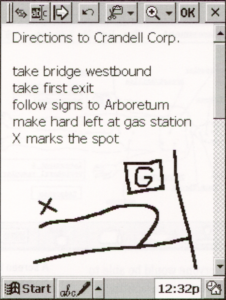
As a control, though, it is not classified as a core operating system service. “We have a very strict definition of what is shipped as part of the operating system for embedded applications,” says O’Hara, “and that part is not there. But as a control, any application can use it, and it’s documented as such.” In the case of the Palm PC, this means that Rich Ink is present not only in the note taker, but also in the notes field of the calendar, tasks, and contacts.
With an interface in place for the direct manipulation of handwritten notes, in the form of digital ink, could Microsoft have included a delayed recognition feature? “We’ve talked about that,” says O’Hara, “but it’s not in the Palm PC.” According to O’Hara, it’s mostly a question of how to handle the user interface. In other words, would you choose to drive the delayed recognition from the desktop, or have the functionality present in the handheld itself?
For example, you could conceivably take notes, synchronize with the desktop, and then use the processing muscle on the bigger computer to perform the recognition. “We see this type of thing perhaps belonging on the desktop side,” says O’Hara. “Here, you would have enough room to position windows with the original ink and the recognized text, allowing you to monitor the process better.”
“At least, that’s the scenario we’ve talked about. But that’s still in the future if and when we decide to do it. Alternatively, someone else may choose to implement something like this.”
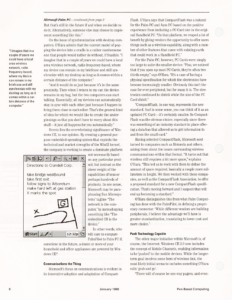
On the issue of synchronization with desktop computers, O’Hara admits that the current model of popping the device into a cradle is a rather cumbersome one that people would rather do without, if feasible. “I imagine that in a couple of years we could have a local area wireless network, radio frequency-based, where my device can remain in my briefcase and still synchronize with my desktop as long as it comes within a certain distance of the computer.”
“I imagine that in a couple of years we could have a local area wireless network, radio frequency-based, where my device can remain in my briefcase and still synchronize with my desktop as long as it comes within a certain distance of the computer.”
“And it would do so just because it’s in the same proximity. Then when I return to my car, the device remains in my bag, but the two computers can start talking. Essentially, all my devices can automatically stay in sync with each other just because I happen to bring them close to each other. That’s the general kind of idea for which we would like to create the underpinnings so that you don’t have to worry about this stuff—it just all happens for you automatically.”
Herein lies the overwhelming significance of Windows CE, in our opinion. By creating a general purpose embedded operating system that exploits the technical and market strengths of the Win32 kernel, the company is working to create a dominate platform not necessarily based on any particular product, but instead on the sheer weight of the capabilities of tens or perhaps hundreds of products. In one sense, Microsoft may be paraphrasing Sun Microsystems’ tagline “The network is the computer,” by instead saying something like “The embedded OS is the device.”
In other words, who will care to compare PalmPilot to Palm PC if, sometime in the future, a dozen or more of your household and office appliances are powered by Windows CE?
Communications the Thing
Microsoft’s focus on communications is evident in its innovative adoption and adaptation of CompactFlash. O’Hara says that CompactFlash was a natural for the Palm PC and Auto PC based on the positive experience from including a PC Card slot in the original Handheld PC. “On that platform, we reaped a lot of benefit by giving vendors the opportunity to offer users things such as a wireless capability, along with a number of other features that came with existing cards that could work in a Handheld PC.”
For the Palm PC, however, PC Cards were simply too large to suite the smaller device. “Plus, we noticed that if you open up most PC Cards, they’re often two thirds empty,” says O’Hara. “It’s a case of having a physical specification for which the electronics have become increasingly smaller. Obviously this isn’t the case for ever peripheral, but for many it is. The electronics continued to shrink while the size of the PC Card didn’t.”
“CompactFlash, in one way, represents the new standard. And in some sense, you can think of it as an updated PC Card—it’s certainly smaller. So CompactFlash was the obvious choice, especially since there was something of an industry standard in place offering a data bus that allowed us to get information to and from the small card.”
Having selected CompactFlash, Microsoft next turned to companies such as Motorola and others, asking them about the issues surrounding wireless communications within that format. “It turns out that wireless still requires a bit more space,” explains O’Hara. “This led us to work with them to define the amount of space required, basically a couple more millimeters in height. We then worked with these companies, as well as the CompactFlash Association, to offer a proposed standard for a new CompactFlash specification. That’s moving forward and I suspect that will end up becoming a standard.”
O’Hara distinguishes this from what Palm Computing has done with the PalmPilot, in defining a proprietary connector. “While different vendors are building peripherals, I believe the advantage we’ll have is greater standardization, translating to lower cost and more choice.”
Push Technology Capable
The other major initiative within Microsoft is, of course, the Internet. Windows CE 2.0 now includes the concept of Mobile Channels, enabling information to be ‘pushed’ to the mobile devices. While the longer-term goal involves some form of wireless link, the most likely initial scenario includes something O’Hara calls ‘grab and go’.
“There will of course be one-way pagers, and eventually widespread two-way pagers available, but it’s going to be a while before some high percentage of users actually have those devices, or find those things of particular value.”
In the grab-and-go model, the idea is that by using Internet Explorer 4 on the desktop, you’ll be able to subscribe to information that’s of interest to you, such as sports or world news. While the handheld is sitting on the desk, it remains plugged in. Using Windows CE 2.0’s active synchronization feature, the new content is pushed through to the handheld.
“That’s phase one,” says O’Hara. “So even without any kind of radio, this is still useful. And it doesn’t have to be timely information, this would apply to reference information as well.”
O’Hara offers the example of a corporate intranet. The information pushed down to the PalmPC could be pricing, or any other database-maintained information. And this could happen over a dial-up connection as well. “But when we have the radio modules available around this summer, some Web content providers or corporate intranet services should start making their content available over a wireless channel. In this scenario, you could download the template for the information for free, as part of a local call, and maintain the most up-to-date information over the air.”
“Service providers can choose be very thrifty in their use of the wireless network, thereby keeping the price of information down,” says O’Hara.
In implementing this strategy, the Windows CE team has adopted standard HTML, with the inherent advantage that content developers are spared from having to provide alternative versions of their information. “We use the Channel Definition Format delivered in Internet Explorer 4,” says O’Hara. “That’s the ‘push’ aspect of the system. Other than that, service providers will just have to be careful to design sites that use formatting and graphics suitable for display on smaller devices.”
Actually, this final step may not even be necessary. Companies such as Spyglass, Inc. are creating tools to perform automatic translation of sites for smaller devices. “We don’t have anything like that right now. It’s a very interesting question in terms of whether that’s something we should provide.”
A Modularized Approach
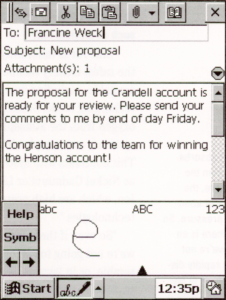
Because Windows CE is designed to serve multiple purposes, the operating system has been designed to be easily compartmentalized. Therefore, differences do exist between the HPC, Palm PC, and Auto PC.
The Palm PC, for example, has no printing capability. “This means that the printing support that’s in the operating system is not included when we compile and build the system,” says O’Hara. These differences extend to application developers, who need to be aware, to some degree, of which platform they’re targeting. Ultimately, it depends on the application.
“It’s certainly possible to write an application that works on both platforms,” says O’Hara. “The vast majority of the APIs are identical. The key issue, however, is the user interface. For example, if the application has dialogs that are wider than 240 pixels, they simply won’t fit on a Palm PC. And so on. We will have to see if developers tend to do it this way, or have different versions.”
The Final Word
O’Hara says that Microsoft is currently in its final testing phase, performing final tuning of the code. In the meantime, he feels optimistic of the platform’s chance for success in vertical markets. “We’ve seen devices like Apple’s Newton experience some degree of success in the medical field, specifically doctors and nurses that walk around but require access to information such as patient records or medical databases.”
“I certainly think that it’s even more likely now that we’ve released Visual Basic for Windows CE. This type of solution is applicable to two types of vertical markets; one being the type that a company like Telxon or others would service, and the other being application specific tasks where a company may select a retail device but still require a custom program.”
“These applications often do not require any special hardware. My favorite example,” says O’Hara, “was in the video we showed at the product launch featuring the Vail Ski School. I’m a part-time ski instructor, so I sent a copy of that tape to my ski school director encouraging him to take a look at this. So here is a vertical application, but one well served by out-of-box handheld PCs.”
Microsoft Corp.
www.microsoft.com/windowsce/palmpc
www.microsoft.com/windowsce/autopc
Transcribed from Pen-Based Computing, Volume 8, Number 1 — January 1998. Pages 1, 2, 8, 9.