
First Looks: A Review of Five Newton Packages
From the Original Pages
Click a page to enlarge · Alt-click to open the full issue
MobileMath
Many of us have long dreamed about a magical piece of mathematical paper where we can jot numbers and equations, and have them automatically calculated. MobileMath, by Newton software developer MobileSoft, comes closest so far to this vision.
MobileMath adds over 80 new requests to Newton’s intelligent assistant that enables you to enter equations in the Notepad and evaluate them directly by tapping the Assist button. MobileMath displays the highlighted result (clever!) in a floating view that you can easily drag into any application.
The program has five groups of functions that are represented by well-selected icons in the MobileMath view. These functions include: General Arithmetic, Financial, Statistics, Date and Time, and Mathematics and Trigonometry.
The package includes MobileMath Tour which presents a very slick overview of the capabilities of MobileMath. You could learn most everything from this tour, however, once you start it, there is no easy way to cancel midway.
The performance of the program is adequate, however, much of the time is probably consumed by overhead from the intelligent assistant. While the manual is well written and clear, we wish it had examples of evaluating long, complex multi-line scientific equations.
MobileMath and MM Tour consumes 164 KB and 77 KB of storage respectively. The program has a list price of US $79. For more information, please contact MobileSoft at (408) 376-3475.
MobileCalc
The first question most mobile professionals ask when they see a new PDA is whether they can use a spreadsheet. This need has been answered by MobileSoft with a spreadsheet they call MobileCalc.
MobileCalc includes some very impressive features and innovations for such a young PDA platform. The program is organized in the familiar grid, however, interaction is very direct and pen-centric.
Using MobileCalc, you can create worksheets up to 50 rows by 26 columns. To help you navigate on the small screen, MobileCalc features a clever scrolling control icon that enables you to zoom in and out, and scroll or page in any direction. (Please refer to the figure on this page).
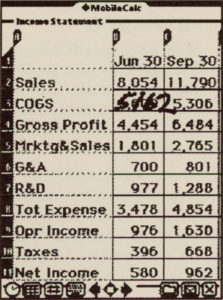
MobileCalc supports over 70 functions and allows you to create complex formulas using a handy equation builder. Copying or moving cell contents is as simple as dragging and dropping.
Several of the program controls are located at the bottom of the screen on the status line. These controls include the Worksheet menu, a keyboard icon, recalculation icons, recognizer controls, and others.
The Worksheet menu enables you to create a new worksheet and insert, delete, and format rows and columns. Using the recalculation icon, you can turn automatic calculation off to enhance system performance during data input.
MobileCalc also includes several features to assist Newton’s handwriting recognition. Using the recognizer control on the status bar, you can inform the system whether you intend to enter just numbers or alphanumeric text. Also, you can use either an on-screen keyboard or unique label palette to fill in cell contents.
The program requires 356 KB of storage, while the accompanying program tour requires 100 KB. The number of features and functions supported by this first release is truly amazing.
The performance of MobileCalc is good compared to the amount of work it is performing, however, it is distinctly slower than a laptop. Of course, you can’t carry a laptop in your palm.
The cost of MobileCalc is US $109. For more information, please contact MobileSoft at (408) 376-3475.
GeoAssist
In order for the Newton to compete with conventional content delivery tools—such as books—it must harness its CPU horsepower to deliver added-value to the content. In many cases, this means being able to manipulate and perform useful operations on the content.
GeoAssist, a new program by Avail Technology, Inc., combines traditional geographic and travel information into a package that provides added-value and is also fun to use.
The program includes a range of useful information including a database of major cities, national and international telephone area codes, NewtonMail access numbers, important 800 numbers in the United States for an assortment of travel needs (including airlines), and other geographic information.
GeoAssist makes very good use of maps and simple animation on the Newton’s small screen. Using the program, you can graphically measure the distance between cities and points in the world, display time zones, and zoom in and out of maps of the world.
GeoAssist provides its most detailed information for the United States and Canada. In addition, it includes an interesting feature called FlightTrack. By entering your starting point and destination, you can have GeoAssist plot a small airplane along the approximate line of travel to give you an idea of how far along you are in the trip.
GeoAssist comes with GATour, a three minute on-screen tour of the program that takes 93 KB on the storage card. The tour is very well done and permits you to set the speed of the tour, along with stopping it at any time.
Overall, program performance is good, and, with minor exceptions, GeoAssist makes very good use of the Newton interface which makes it worth looking at for this reason alone. The content is useful mostly for North American travellers, however we expect that more information will be available in the future.
GeoAssist uses 475 KB of storage and is priced at US $59. For more information, please contact Avail Technology, Inc. at (408) 730-6855.
ExpensePlus
PDAs are at their best when they are with you on trips. And something that always occurs when travelling are expenses. Now, accounting software developer State Of The Art has introduced ExpensePlus, a complete expense collection and reporting package for the Newton.
ExpensePlus is particularly useful because it uses Newton’s intelligent assistant to perform several operations. This enables you to enter your expenses either by using ExpensePlus itself, or by writing it on the NotePad and then having the assistant enter it into your expense report.
The main screen of the program is illustrated in the figure on this page. ExpensePlus makes effective use of icons to organize the various expense categories, and presents a list of expenses below.
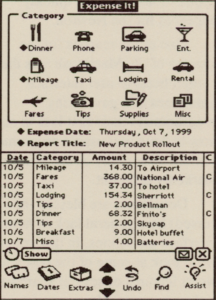
The program is international-savvy and enables you to enter foreign currencies—with exchange rates—that are converted automatically to your home currency.
You start an expense report by filling in a form with the report title, purpose, location, and cash advance. Following this, you simply fill out expense slips giving the category of the expense, the amount, and a description. ExpensePlus files all the information away until you are ready to prepare a summary, print a report, or move the data over to a Mac or Windows-based desktop PC.
Entering expenses using the intelligent assistant is just as easy. Simply enter a currency symbol (such as a dollar sign), the value, and the category, then tap the Assist button on the Newton.
ExpensePlus recognizes the names of most airlines, hotel chains, and rental car agencies. It also understands words such as lunch, dinner, and many others.
Information that you record on a trip can be imported into Excel and other programs on the Mac including State Of The Art’s MacP&L accounting program. The ExpensePlus Receiver for Windows performs a similar function on PCs.
ExpensePlus is an ideal program to take on a business trip. The program requires 238 KB of storage and costs US $139.95. For more information, contact State Of The Art at (714) 753-1222.
GoFigure
One of the advantages of a device like the Newton is that it is capable of serving as a virtual device. This enables you to carry several different types of devices all inside one compact unit.
One of the first applications for the Newton, called GoFigure, does just this by creating 16 different virtual calculators as proposed. Published by Dubl-Click Software, the calculators range from a standard adding machine, to subjects as varied as architectural, baby, conversions, currency, dates, graphic arts, scientific, restaurant, film editing, and others.
Calculators in GoFigure come in two flavors: formula and traditional. Formula calculators look like forms that contain two or more data entry lines; traditional calculators have the familiar button, LED, and paper tape appearance.
GoFigure is flexible by accepting both handwriting and keypad entry just about anywhere you can enter numbers. However, while every calculator is well laid-out, some of the fields are simply too small to effectively write into.
The various calculators integrate well with Newton applications and each other. You can copy and move highlighted information in the familiar Newton way. In addition, GoFigure has 100 “memory registers” that function just like the memory on standard calculators. This enables you to access register data in any calculator.
The program maintains your preferences between use and includes several interesting options. For example, you can set the calculators to function using algebraic notation or Reverse Polish Notation. You can also specify whether you are left or right-handed to affect the layout.
The program uses simple, but effective sound effects which, in some cases, mimics an old mechanical desk calculator. The performance of the program is good, and appears to match the general performance of the Newton.
GoFigure is a useful program that uses about 407K of storage on your card. The program sells for US $79.95. For more information, please contact Dubl-Click Software at (818) 888-5405.
Transcribed from Pen-Based Computing, Volume 4, Number 2 — March 1994. Pages 3, 4, 5.