
HP Introduces Impressive OmniGo 100
From the Original Pages
Click a page to enlarge · Alt-click to open the full issue
On October 16, 1995, Hewlett-Packard announced a new personal organizer called the OmniGo 100. It is a small keyboard-based device that, on the surface, has more in common with the Sharp organizers, the Psion 3a, and the HP LX-series devices than Newtons or Magic Cap devices. Regardless of what you want to call it, it’s fully programmable. And while it is inexpensive (street price is estimated at US $350), and it should be very successful. That means there are opportunities for developers interesting in creating OmniGo applications.
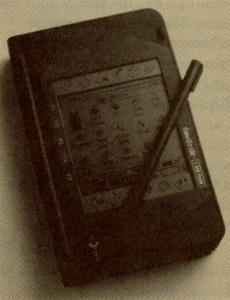
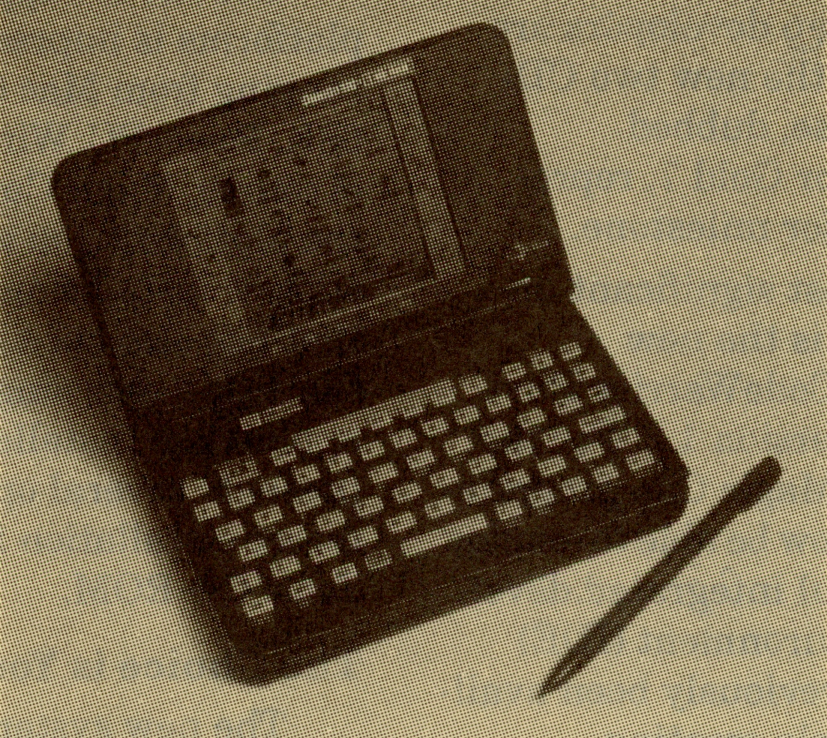
At first glance, the OmniGo 100 looks a lot like the popular HP 100 and 200 LX-series devices with a clamshell case that opens up to reveal a 240 x 240 pixel LCD screen on one side and a keyboard on the other. It’s actually a little bit smaller and lighter than the LX devices: 6 x3.7 x 1″ (15.3 x 9.6 x 2.6 cm) and 11.6 oz. (329 g) with batteries. The screen fills about two-thirds of the lid.
The keyboard also has fewer keys than the 100 and 200 (for instance, there are only five function keys). The clamshell hinge supports 180-degree rotation so you can fold the screen back behind the keyboard and hold the device in one hand. This lets you use the pen on the screen just as you would with a Newton.
HP has also taken a few cues from other PDA manufacturers. First, there are icons stenciled on the left and right sides of the LCD screen. Like the current Apple MessagePads, you tap the icons to launch the most popular ROM-based applications. The icons are stenciled on a 45-degree axis, an odd choice, until you realize that the screen supports both portrait and landscape modes. The stencils are quite readable in both orientations. Because the screen is square, there is no delay when switching orientation—the graphics don’t require any remapping, just redrawing.
Second, like the Sharp Zaurus, the device supports both pen and keyboard input (the pen slides into the front of the case). All text-based applications accept keyboard input, but you can also enter characters using the pen and Palm Computing’s Graffiti, which is included in the OmniGo ROM. Many applications also support digital ink. You can use the pen for copy and paste operations and the user interface supports drag and drop operations.
The CPU is a 16-bit 80186-compatible chip and there is 3 MB of ROM that contains all the GEOS OS code and the built-in applications. GEOS executes primarily from ROM, minimizing execution times for OS functions. There is also 1 MB of RAM for application and file storage, with 640K available as user application memory. The user interface does not support the concept of disk volumes. Instead, data is integrated with its creator application to provide a more seamless user experience that the traditional program/data dichotomy.
For connecting to the outside world, there is an S-wire serial port, several built-in printer drivers, and a PC Card Type II slot. Oddly, HP did not include an IrDA-compatible infrared port. It would have added very little to the cost of the device, and would be a welcome addition. The OmniGo runs off of two 1.5-volt AA batteries, however, we were unable to confirm how much usage you can expect from two fully-charged batteries.
The Software
The OmniGo 100 includes quite a few built-in applications. There is basic PIM software: an appointment book (with a to do list and alarms), a phone book (with categories and subset viewing), a notepad (with modest formatting capabilities), a database, world time (with user-definable cities), stop watch, and a user setup utility.
The database, which is the underlying engine for data management for most of the built-in programs, is a simple flat-file application. It supports text, number, date, time, category, choice list, and check button fields. There doesn’t appear to be any linking between application data stores. For instance, you can’t link a name in the phone book with an appointment, or link a phone book item with a database record.
In addition to the basic PIM software, the OmniGo contains Geoworks’ Book Reader (which is the engine for the extensive on-line help system), a spreadsheet (maximum 64 x 64 sheet size), an HP 12C emulator (perhaps the most popular financial calculator in the world), and a variety of financial tools including some basic statistics with graphing, and a general-purpose, multivariable equation solver. There is also a ROM-based version of Solitaire for those long airplane flights.
In an effort to minimize the amount of time required to jot quick notes and small bits of information on the fly, there is a program called the Jotter, which is sort of a system-wide sticky note creator. The Jotter lets you enter a quick bit of information anytime, anywhere, and attach it to a specific application for formal data later on. This minimizes the amount of time required to do a simple, interrupt-driven task like writing down a phone number on the fly. Most of the built-in applications support notes.
Although HP is marketing the OmniGo 100 as a personal organizer, they recognize in a limited fashion that many people need communication capabilities. Unfortunately, there is no built-in modem, and you can’t get an HP-branded modem for the OmniGo. Third-party PC Card modems should work, but there are no drivers client software to support basic wired e-mail services like the Internet, CompuServe, or America Online.
The Operating System
The OmniGo has an almost off-the-shelf version of GEOS 2.0 embedded in ROM. Almost 100% of the code is execute-in-place, making the device quite responsive. In addition, the overall architecture is multi-threaded. Once you launch an application, it stays in memory making switching between applications even quicker.
Geoworks has added a few extensions to GEOS 2.0 specifically for the OmniGo. The first is a new Table object type that lets programmers easily create dynamic scrolling tables where each column has the same data type and each row has a different set of values for the column data types. Tables support in-place editing, range selections, automatic scrolling, and drag and drop. Tables don’t store any data – the underlying application is responsible for that.
The biggest addition to standard GEOS is the HP database engine, adapted from the HP LX-series devices. It is the heart of most of the OmniGo data-centric applications. Geoworks has added a new API to GEOS to let you work directly with the database engine, enabling you to easily read and write the standard OmniGo data stores, and also create custom databases.
Summary
Even with the lack of serious wired communication capabilities, and an IrDA-compatible port, the OmniGo 100 should be a winner. It’s got a good mix of basic PIM features, keyboard and pen input, a very reasonable price, an open robust system architecture, and marketing and distribution by a company that understands consumer channels. Although HP is calling it a personal organizer, it’s got most of the features I need in a hand-held device.
This article is excerpted from PDA Developers Magazine and appears here by special arrangement. Copyright © 1995, Creative Digital, Inc.
Transcribed from Pen-Based Computing, Volume 5, Number 11 — November 1995. Pages 6, 7.