GO Corporation – Installing PenPoint Demo Release, Beta Phase 2
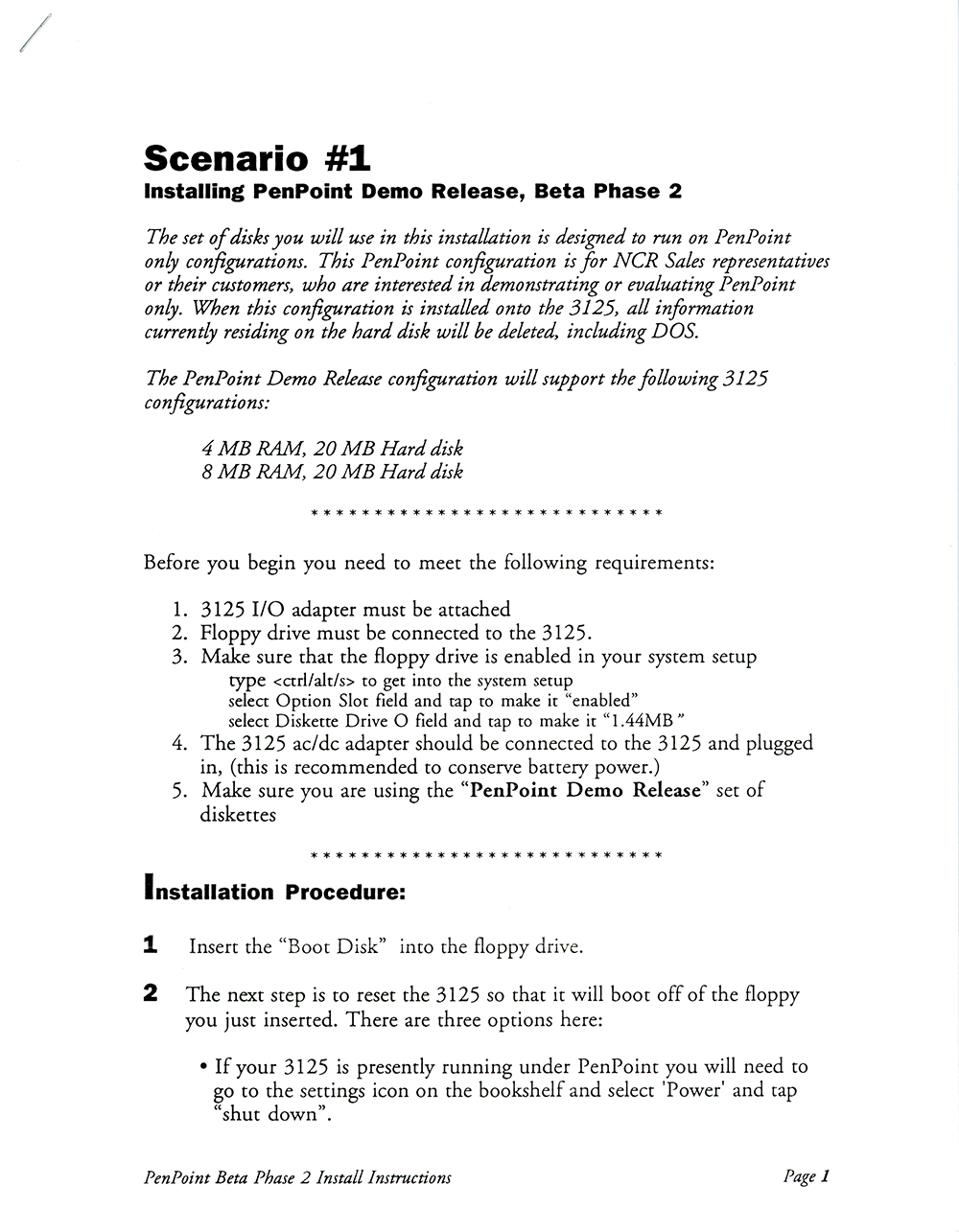
A 15-page, single-sided, laser-printed document presenting three scenarios for installing the PenPoint demo release (PenPoint Beta Phase 2).
Were you involved with this artifact? If so, we would like to include your story on this page. Let us know how you contributed.
Artifact Details
GO Corporation
United States
English
June, 1991
A 15-page, single-sided, laser-printed document, stapled in the top-left corner.
The scenarios include:
- Scenario #1: Installing PenPoint Demo Release, Beta Phase 2 (3 pages)
- Scenario #2: Installing "PenPoint with DOS Demo Release" on a 3125 w/floppy (4 pages)
- Scenario #3: Installing "PenPoint with DOS Demo Release" via LapLink (8 pages)
8.5" x 11" (15 pages)
1993
Acquired from developer
2018-05-15
Organizations

History
GO Corporation – Installing PenPoint Demo Release, Beta Phase 2 is an installation guide for the demo release of GO Corporation's PenPoint operating system — labeled on the document as Beta Phase 2 — prepared for use on the NCR System 3125 pen computer.1 Its opening scenario describes a "PenPoint only" configuration intended for NCR Safari representatives and their customers who wanted to demonstrate or evaluate PenPoint, and it states that the demo release supported the 3125 in either a 4 MB RAM / 20 MB hard disk or an 8 MB RAM / 20 MB hard disk configuration.1
GO Corporation, founded in Foster City, California in 1987, announced the developer release of PenPoint on January 22, 1991, describing it as a general-purpose operating system for mobile computers operated by a pen rather than a keyboard or mouse, with availability planned for February.2 On the same day, NCR Corporation announced its intent to support PenPoint on future pen-based hardware.3
On June 24, 1991, NCR announced the System 3125, an Intel 386SL-based notepad weighing 3.9 pounds that supported both Microsoft's Windows for Pen Computing and GO's PenPoint, came standard with 4 MB of memory expandable to 20 MB, and was scheduled for delivery beginning in August.4 GO demonstrated PenPoint running on the 3125 that same day, the first announced Intel 386-based pen hardware platform.5
GO announced its PenPoint Beta Program on October 21, 1991, structured to expand availability of the operating system in phases ahead of the production release of PenPoint 1.0, then planned for the first quarter of 1992.6 GO released the commercial version of PenPoint, together with the PenPoint Software Development Kit, on April 16, 1992.7
AI generated using primary sources referenced in the footnotes
Footnotes
- GO Corporation, GO Corporation – Installing PenPoint Demo Release, Beta Phase 2 (image scan), June 1991
- GO Corporation, GO Announces PenPoint Operating System for Mobile Pen-Based Computing, January 22, 1991
- NCR Corporation, NCR Announces Intent to Support GO PenPoint, January 22, 1991
- NCR Corporation, NCR Corporation Announces the NCR System 3125, June 24, 1991
- GO Corporation, GO Corporation Sees Pen Computing Market Emerge with NCR Announcement of Pen Hardware Platform, June 24, 1991
- GO Corporation, GO Expands Licensing, Education and Beta Programs to Accelerate Mobile Computer Market Development, October 21, 1991
- GO Corporation, GO Corp. Announces Availability of PenPoint, April 16, 1992
Oral History
Media
GO Corporation – Introducing PenPoint (1991)
GO Corporation used this video to promote the developer release of the PenPoint OS in 1991. PenPoint was one of the first operating systems designed specifically to run on mobile devices. Featuring: Dr. Norm Vincent (State Farm), Terry Conner (EDS), Phillipe Kahn (Borland), Jack Blount (Novell), David Reed (Lotus), Alan Lefkof (Grid), Vern Raburn (Slate), Dan Bricklin (Slate), and Jim Cannavino (IBM).
PenPoint Demonstration 1991
GO Corporation’s 1991 promotional video about their pen-based operating system, aimed at software developers. Includes an extensive demo by Robert Carr, architect of the operating system, where he shows the notebook metaphor, their use of gestures, the embedded document architecture, and more.
Connections
This artifact's place in the wider network of people, organizations, and artifacts. Drag to pan, scroll to zoom, and tap any node to focus its connections.